
This script generates an interactive HTML dashboard that looks like a professional security operations center (SOC) report, complete with animations and filtering capabilities. This PowerShell script is one hundred percent safe and can be use in production environment.
<#
.SYNOPSIS
    Audits NTLM authentication across Active Directory and generates an HTML Report.

.DESCRIPTION
    This script queries Security Event Logs (ID 4624) to identify devices
    authenticating via NTLM instead of Kerberos. It filters out standard
    noise and generates a styled HTML report.

.PARAMETER MaxEvents
    The maximum number of events to scan per Domain Controller. Default is 5000.

.PARAMETER DCs
    An array of Domain Controllers to query. If not provided, it queries the current DC.

.PARAMETER OutputPath
    The path where the HTML report will be saved.

.EXAMPLE
    .\Audit-NTLM.ps1 -MaxEvents 10000 -OutputPath "C:\Reports\NTLMAudit.html"
#>
param(
    [int]$MaxEvents = 5000,
    [string[]]$DCs = @($env:LOGONSERVER.TrimStart('\\')), # Default to current DC
    [string]$OutputPath = ".\NTLM_Audit_Report_$(Get-Date -Format 'yyyyMMdd_HHmmss').html"
)

# --- Configuration ---
$ExcludedPackages = @("NTLM V2", "Negotiate") # Sometimes NTLM V2 is acceptable, set to empty to capture all
$ExcludedAccounts = @("SYSTEM", "NETWORK SERVICE", "LOCAL SERVICE", "ANONYMOUS LOGON", "$")
$ExcludedIps = @("::1", "127.0.0.1")

Write-Host "Starting NTLM Audit..." -ForegroundColor Cyan
Write-Host "Target DCs: $($DCs -join ', ')" -ForegroundColor Gray

# --- Data Collection ---
$Results = @()

foreach ($DC in $DCs) {
    Write-Host "`nQuerying Domain Controller: $DC ..." -ForegroundColor Yellow

    try {
        # Event ID 4624: An account was successfully logged on.
        # Authentication Package = NTLM indicates the protocol used.
        $Events = Get-WinEvent -ComputerName $DC -FilterHashtable @{
            LogName = 'Security'
            ID = 4624
        } -MaxEvents $MaxEvents -ErrorAction Stop

        Write-Host "Found $($Events.Count) Logon events. Processing..." -ForegroundColor Gray

        $ParsedEvents = $Events | ForEach-Object {
            $xml = [xml]$_.ToXml()
            $EventData = $xml.Event.EventData.Data

            # Helper to get data from XML nodes
            $GetProperty = { param($Name) ($EventData | Where-Object { $_.Name -eq $Name }).'#text' }

            [PSCustomObject]@{
                TimeCreated    = $_.TimeCreated
                DC             = $DC
                TargetUserName = & $GetProperty "TargetUserName"
                TargetDomain   = & $GetProperty "TargetDomainName"
                IpAddress      = & $GetProperty "IpAddress"
                Workstation    = & $GetProperty "WorkstationName"
                LogonType      = & $GetProperty "LogonType"
                AuthPackage    = & $GetProperty "AuthenticationPackageName"
                LmPackage      = & $GetProperty "LmPackageName" # Often NTLM V1 or V2
                ProcessName    = & $GetProperty "ProcessName"
            }
        }

        # Filter for NTLM only
        $NTLM_Events = $ParsedEvents | Where-Object {
            $_.AuthPackage -eq "NTLM" -and
            $_.TargetUserName -notin $ExcludedAccounts -and
            $_.IpAddress -notin $ExcludedIps -and
            $_.TargetUserName -notmatch '\$' # Filter out computer accounts
        }

        $Results += $NTLM_Events
        Write-Host "Identified $($NTLM_Events.Count) NTLM events." -ForegroundColor Green
    }
    catch {
        Write-Warning "Failed to query $DC. Error: $_"
    }
}

# --- Analysis ---
$Summary = $Results | Group-Object -Property Workstation | Select-Object Name, Count | Sort-Object Count -Descending
$UserSummary = $Results | Group-Object -Property TargetUserName | Select-Object Name, Count | Sort-Object Count -Descending
$TotalEvents = $Results.Count
$UniqueDevices = ($Results.Workstation | Sort-Object -Unique).Count

Write-Host "`nAnalysis Complete. Generating Report..." -ForegroundColor Cyan

# --- HTML Generation ---
$HtmlHead = @"
<!DOCTYPE html>
<html lang="en">
<head>
    <meta charset="UTF-8">
    <meta name="viewport" content="width=device-width, initial-scale=1.0">
    <title>NTLM Audit Report</title>
    <script src="https://cdn.tailwindcss.com"></script>
    <link href="https://cdnjs.cloudflare.com/ajax/libs/font-awesome/6.0.0/css/all.min.css" rel="stylesheet">
    <style>
        @import url('https://fonts.googleapis.com/css2?family=Inter:wght@300;400;600;700&display=swap');
        body { font-family: 'Inter', sans-serif; background-color: #0f172a; color: #e2e8f0; }
        .glass-panel {
            background: rgba(30, 41, 59, 0.7);
            backdrop-filter: blur(12px);
            border: 1px solid rgba(255, 255, 255, 0.1);
            box-shadow: 0 4px 6px -1px rgba(0, 0, 0, 0.1), 0 2px 4px -1px rgba(0, 0, 0, 0.06);
        }
        .chart-bar { transition: width 1s ease-in-out; }
        tr { transition: all 0.2s; }
        tr:hover { background-color: rgba(56, 189, 248, 0.1); transform: scale(1.005); }
        .fade-in { animation: fadeIn 0.8s ease-out forwards; opacity: 0; }
        @keyframes fadeIn { from { opacity: 0; transform: translateY(10px); } to { opacity: 1; transform: translateY(0); } }
    </style>
</head>
<body class="antialiased min-h-screen p-4 md:p-8">

    <!-- Header -->
    <header class="max-w-7xl mx-auto mb-8 flex justify-between items-center fade-in" style="animation-delay: 0.1s;">
        <div>
            <h1 class="text-4xl font-bold text-transparent bg-clip-text bg-gradient-to-r from-cyan-400 to-blue-500">
                <i class="fas fa-shield-alt mr-3"></i>NTLM Authentication Audit
            </h1>
            <p class="text-slate-400 mt-2">Security Analysis Report • Generated: $(Get-Date)</p>
        </div>
        <div class="text-right">
            <div class="inline-flex items-center px-4 py-2 rounded-full bg-red-500/20 border border-red-500/50 text-red-400">
                <span class="animate-pulse w-2 h-2 bg-red-500 rounded-full mr-2"></span>
                $TotalEvents Events Detected
            </div>
        </div>
    </header>

    <!-- Dashboard Grid -->
    <div class="max-w-7xl mx-auto grid grid-cols-1 md:grid-cols-3 gap-6 mb-8">

        <!-- Stat Card 1 -->
        <div class="glass-panel rounded-2xl p-6 fade-in" style="animation-delay: 0.2s;">
            <div class="flex items-center justify-between mb-4">
                <h3 class="text-slate-400 text-sm font-semibold uppercase tracking-wider">Unique Devices</h3>
                <div class="p-2 bg-blue-500/20 rounded-lg text-blue-400"><i class="fas fa-desktop"></i></div>
            </div>
            <div class="text-3xl font-bold text-white">$UniqueDevices</div>
            <div class="text-xs text-slate-500 mt-2">Workstations using NTLM</div>
        </div>

        <!-- Stat Card 2 -->
        <div class="glass-panel rounded-2xl p-6 fade-in" style="animation-delay: 0.3s;">
            <div class="flex items-center justify-between mb-4">
                <h3 class="text-slate-400 text-sm font-semibold uppercase tracking-wider">Total Events</h3>
                <div class="p-2 bg-amber-500/20 rounded-lg text-amber-400"><i class="fas fa-exclamation-triangle"></i></div>
            </div>
            <div class="text-3xl font-bold text-white">$TotalEvents</div>
            <div class="text-xs text-slate-500 mt-2">Logon events scanned</div>
        </div>

        <!-- Stat Card 3 -->
        <div class="glass-panel rounded-2xl p-6 fade-in" style="animation-delay: 0.4s;">
            <div class="flex items-center justify-between mb-4">
                <h3 class="text-slate-400 text-sm font-semibold uppercase tracking-wider">Top Offender</h3>
                <div class="p-2 bg-purple-500/20 rounded-lg text-purple-400"><i class="fas fa-user-secret"></i></div>
            </div>
            <div class="text-xl font-bold text-white truncate">$($Summary[0].Name)</div>
            <div class="text-xs text-slate-500 mt-2">Highest NTLM usage</div>
        </div>
    </div>

    <!-- Main Content Area -->
    <div class="max-w-7xl mx-auto grid grid-cols-1 lg:grid-cols-2 gap-8">

        <!-- Detailed Table -->
        <div class="glass-panel rounded-2xl p-6 lg:col-span-2 fade-in" style="animation-delay: 0.5s;">
            <div class="flex justify-between items-center mb-6">
                <h2 class="text-xl font-bold text-white"><i class="fas fa-list-ul mr-2 text-cyan-400"></i>Device Communication Log</h2>
                <input type="text" id="searchInput" onkeyup="filterTable()" placeholder="Search devices or users..."
                       class="bg-slate-800 border border-slate-700 text-sm rounded-lg focus:ring-cyan-500 focus:border-cyan-500 block w-64 p-2.5 text-white placeholder-slate-500">
            </div>

            <div class="overflow-x-auto rounded-lg border border-slate-700">
                <table class="w-full text-sm text-left text-slate-300" id="auditTable">
                    <thead class="text-xs text-slate-400 uppercase bg-slate-800/50">
                        <tr>
                            <th scope="col" class="px-6 py-3">Time</th>
                            <th scope="col" class="px-6 py-3">Workstation</th>
                            <th scope="col" class="px-6 py-3">User Account</th>
                            <th scope="col" class="px-6 py-3">IP Address</th>
                            <th scope="col" class="px-6 py-3">Auth Package</th>
                            <th scope="col" class="px-6 py-3">Status</th>
                        </tr>
                    </thead>
                    <tbody>
"@

# Generate Table Rows
$HtmlRows = ""
foreach ($event in ($Results | Sort-Object TimeCreated -Descending)) {
    $TimeStr = $event.TimeCreated.ToString("yyyy-MM-dd HH:mm")
    $StatusBadge = '<span class="bg-red-500/20 text-red-400 text-xs font-medium px-2.5 py-0.5 rounded border border-red-500/30">NTLM Auth</span>'

    $HtmlRows += @"
                        <tr class="bg-slate-800/30 border-b border-slate-700 hover:bg-slate-700/50 transition-colors">
                            <td class="px-6 py-4 font-mono text-slate-400">$TimeStr</td>
                            <td class="px-6 py-4 font-semibold text-white">$($event.Workstation)</td>
                            <td class="px-6 py-4">$($event.TargetDomain)\$($event.TargetUserName)</td>
                            <td class="px-6 py-4 font-mono text-xs text-slate-500">$($event.IpAddress)</td>
                            <td class="px-6 py-4"><code class="bg-slate-900 px-2 py-1 rounded text-amber-400">$($event.AuthPackage)</code></td>
                            <td class="px-6 py-4">$StatusBadge</td>
                        </tr>
"@
}

# Generate Summary Chart (Top 5 Devices)
$TopDevices = $Summary | Select-Object -First 5
$MaxCount = ($TopDevices | Measure-Object -Property Count -Maximum).Maximum
$ChartHtml = ""
foreach ($dev in $TopDevices) {
    $Percent = [math]::Round(($dev.Count / $MaxCount) * 100)
    $ChartHtml += @"
                    <div class="mb-4">
                        <div class="flex justify-between mb-1">
                            <span class="text-sm font-medium text-slate-300">$($dev.Name)</span>
                            <span class="text-sm font-medium text-slate-400">$($dev.Count) events</span>
                        </div>
                        <div class="w-full bg-slate-700 rounded-full h-2.5">
                            <div class="bg-gradient-to-r from-cyan-500 to-blue-500 h-2.5 rounded-full chart-bar" style="width: $Percent%"></div>
                        </div>
                    </div>
"@
}

$HtmlTail = @"
                    </tbody>
                </table>
            </div>
        </div>

        <!-- Top Devices Chart -->
        <div class="glass-panel rounded-2xl p-6 fade-in" style="animation-delay: 0.6s;">
            <h2 class="text-xl font-bold text-white mb-6"><i class="fas fa-chart-bar mr-2 text-purple-400"></i>Top NTLM Devices</h2>
            <div class="mt-2">
                $ChartHtml
            </div>
            <div class="mt-6 p-4 bg-amber-500/10 border border-amber-500/20 rounded-lg">
                <div class="flex items-start">
                    <i class="fas fa-info-circle text-amber-400 mt-1 mr-3"></i>
                    <div>
                        <h4 class="text-sm font-bold text-amber-400">Recommendation</h4>
                        <p class="text-xs text-slate-400 mt-1">
                            Investigate the top devices. NTLM is less secure than Kerberos.
                            Check if these are legacy systems, misconfigured applications, or external connections.
                        </p>
                    </div>
                </div>
            </div>
        </div>

        <!-- Top Users -->
        <div class="glass-panel rounded-2xl p-6 fade-in" style="animation-delay: 0.7s;">
            <h2 class="text-xl font-bold text-white mb-6"><i class="fas fa-users mr-2 text-green-400"></i>Top Affected Users</h2>
            <ul class="divide-y divide-slate-700">
"@

foreach ($user in ($UserSummary | Select-Object -First 5)) {
    $HtmlTail += @"
                <li class="py-3 sm:py-4">
                    <div class="flex items-center space-x-4">
                        <div class="flex-shrink-0">
                            <div class="w-8 h-8 rounded-full bg-slate-700 flex items-center justify-center text-slate-400 font-bold">
                                $($user.Name.Substring(0,1))
                            </div>
                        </div>
                        <div class="flex-1 min-w-0">
                            <p class="text-sm font-medium text-white truncate">$($user.Name)</p>
                            <p class="text-sm text-slate-500 truncate">NTLM Logins</p>
                        </div>
                        <div class="inline-flex items-center text-base font-semibold text-white">
                            $($user.Count)
                        </div>
                    </div>
                </li>
"@
}

$HtmlTail += @"
            </ul>
        </div>

    </div>

    <footer class="max-w-7xl mx-auto mt-12 text-center text-slate-600 text-sm pb-8 fade-in" style="animation-delay: 0.8s;">
        <p>Generated by Automated PowerShell </p>
    </footer>

    <script>
        function filterTable() {
            var input, filter, table, tr, td, i, txtValue;
            input = document.getElementById("searchInput");
            filter = input.value.toUpperCase();
            table = document.getElementById("auditTable");
            tr = table.getElementsByTagName("tr");

            for (i = 1; i < tr.length; i++) {
                td = tr[i].getElementsByTagName("td")[1]; // Workstation column
                td2 = tr[i].getElementsByTagName("td")[2]; // User column
                if (td || td2) {
                    txtValue = (td.textContent || td.innerText) + (td2.textContent || td2.innerText);
                    if (txtValue.toUpperCase().indexOf(filter) > -1) {
                        tr[i].style.display = "";
                    } else {
                        tr[i].style.display = "none";
                    }
                }
            }
        }
    </script>
</body>
</html>
"@

# --- Output ---
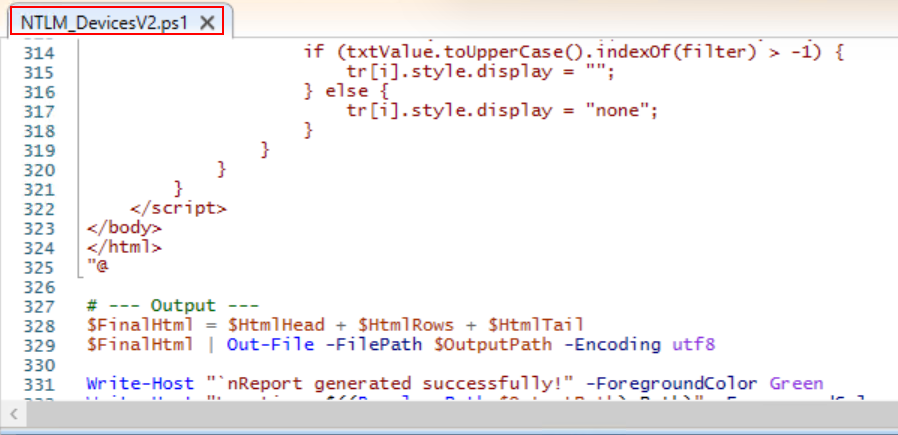
$FinalHtml = $HtmlHead + $HtmlRows + $HtmlTail
$FinalHtml | Out-File -FilePath $OutputPath -Encoding utf8

Write-Host "`nReport generated successfully!" -ForegroundColor Green
Write-Host "Location: $((Resolve-Path $OutputPath).Path)" -ForegroundColor Cyan
Invoke-Item $OutputPath
Here is the details how that this script can be used, Copy the above code and paste in your domain controller server in PowerShell ISE and save somewhere as per your desire. Please read the Microsoft article how to audit NTLMV1 on windows Server, where Microsoft has explained the details to identify Weak authentication used NTLM using Event viewer in detail.
In this script comment is also provide which will tell you capabilities and general guide how to use this script. Save the script in your active directory server with any name you wish.
Open PowerShell with administrative privilege and run the script.

Sample report

Here the report generated while writing this article can be downloaded using below download icon.
That’s it!
In the article we have provided excellent script to find computer list that are authenticating with domain controller using NTLM. In the next article you will be understanding to disable NTLM authentication using group policy object.


https://shorturl.fm/qT6aP